How to Setup a Google Ads MCP Server (and 5 real lessons I learned)
Google Ads is one of the last ad platforms with no managed MCP server. Here is how to build your own locally or on Cloud Run, and the five things that broke on me first.

 The Google Ads MCP server I run on Cloud Run, connected to Claude.
So you're getting into AI and you realize that Google doesn't have a managed MCP server huh? Don't worry, you're not the first person to realize this. Google Ads is one of the last remaining ad platforms that doesn't have its own dedicated Google Ads MCP server and it's causing headaches for marketers around the world.
So after seeing tons of comments on social media asking for a setup guide, I thought I would put one together. This guide will go over what an MCP server is, how it works with the Google Ads API, and how to set up your own Google Ads MCP server as either a Local Server or a Google Cloud Project.
What Is an MCP Server Anyway?
MCP stands for "Model Context Protocol" and a Server is just a computer that exists to handle specific tasks.
So if you join those together, an MCP Server is a server that exists to allow an AI model the ability to execute specific tasks. The AI Model will usually do this through an API that's contained inside the MCP server. If you want the formal spec, it lives at modelcontextprotocol.io.
What's an API?
An API is short for "Application Programming Interface". In short, it's the way that most computers and servers talk to each other without needing a browser, a website, or a graphical interface to do it.
What's the Difference Between an MCP Server and an API?
Very little for most people to be honest. But the core difference is basically that an MCP server exists as a kind of container that is specifically designed to help an LLM know what kind of API requests to make.
If you already have an API for something, you can usually tell AI to do the exact same thing you would ask an MCP server for. But the bonus of an MCP server is it reduces your risk of accidentally sharing your API key with other people (a massive security risk), and also standardizes the process for your LLM of choice.
How Does an MCP Server Usually Work?
Usually, a company has an API that they have designed to programmatically take actions in their software. An MCP server usually works by giving you a URL that you add to an AI model and it opens a new tab for you to sign into your account.
It looks something a bit like this:
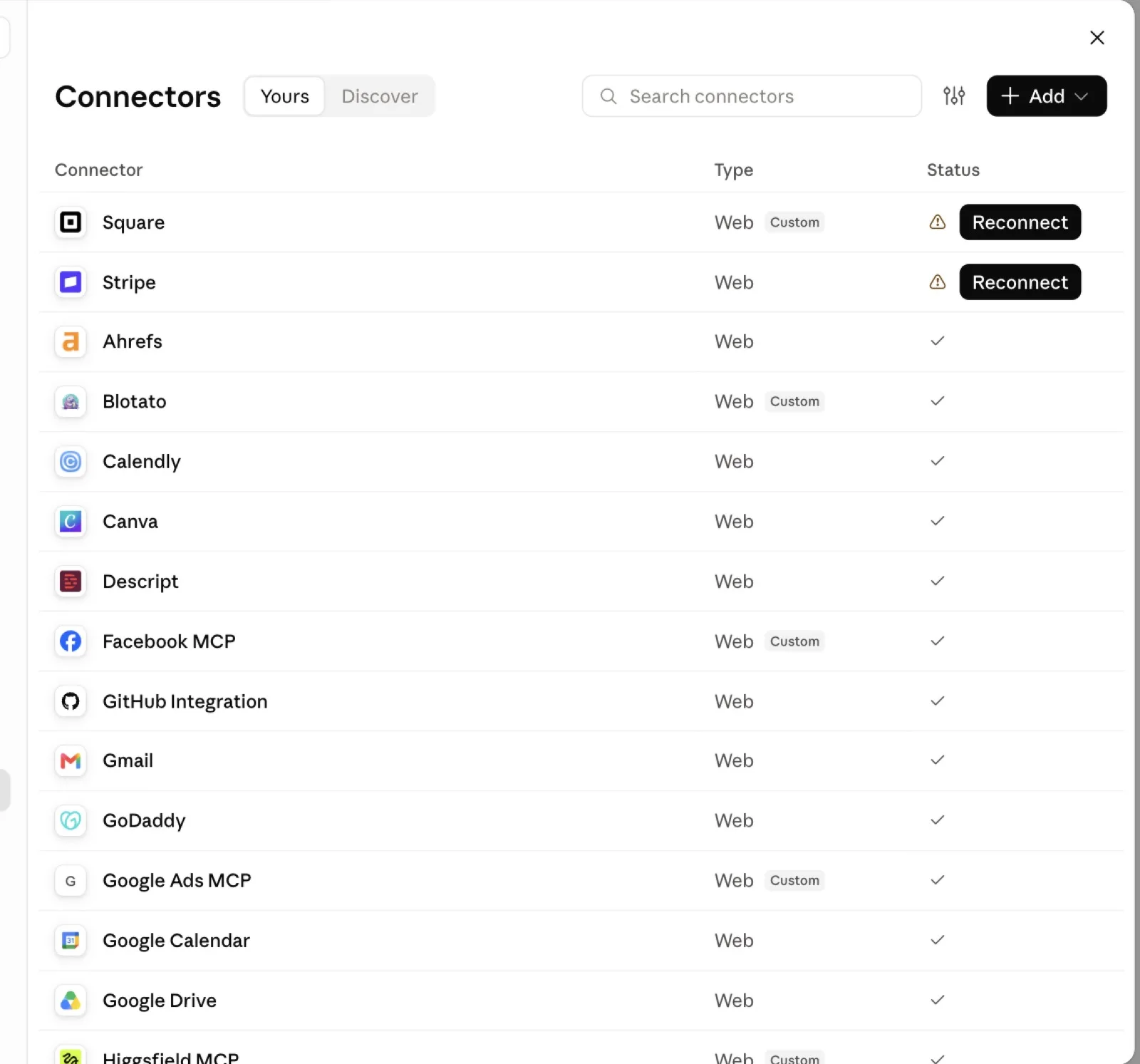
Then when you click the "Plus" it gives you an option to continue connecting.
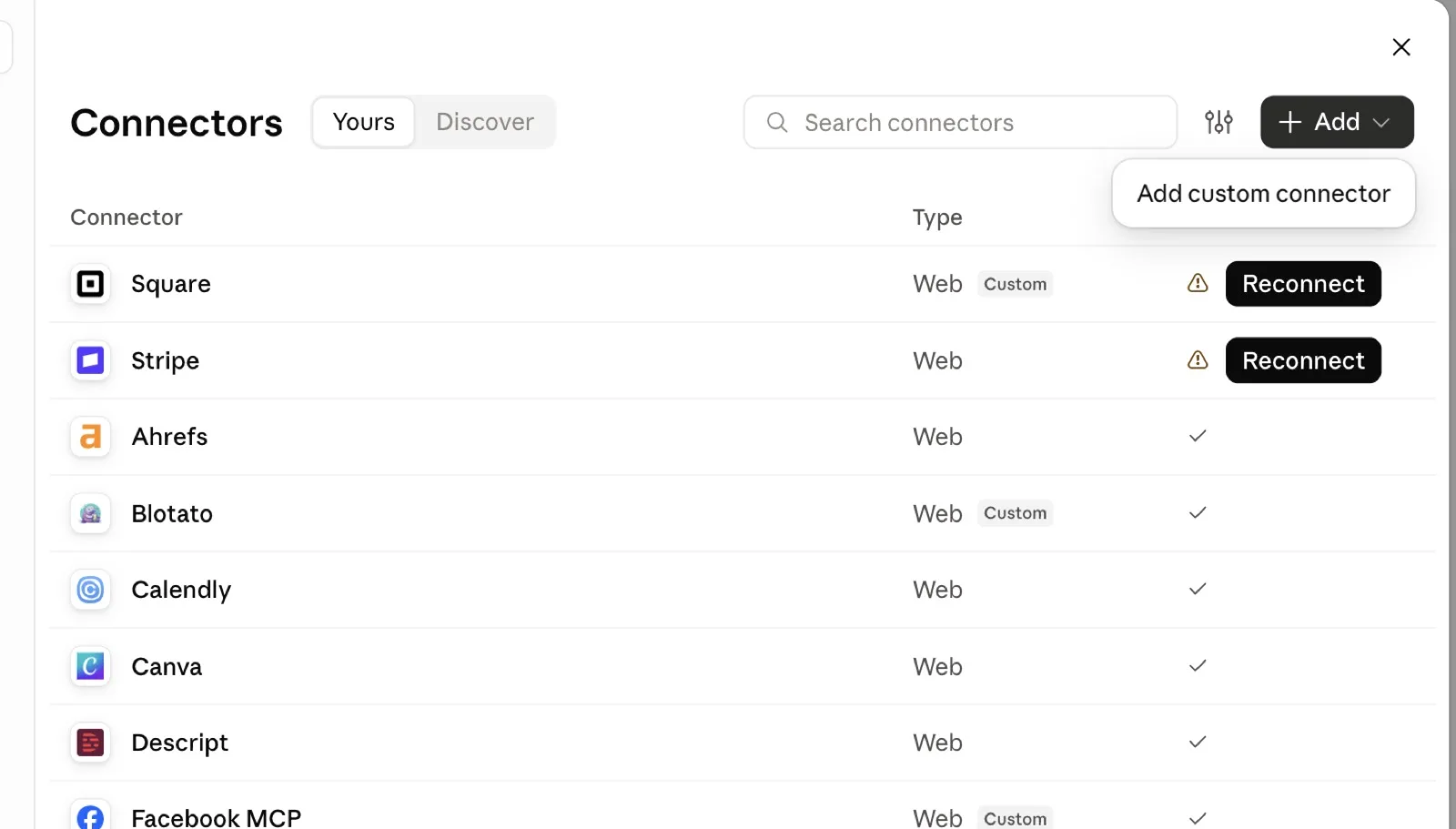
Unfortunately, Google Ads doesn't have a traditional connector that follows this process. Luckily, you can actually make your own! Let's get into it.
What Is the Google Ads MCP?
Google Ads doesn't really have a traditional MCP server. They have a github link for an MCP server... but a github repository is not the same thing as an actual dedicated server.
The github code they give people is the code to get an MCP server up and running, but it's actually not the server itself. So for most people, this means you have one of two options.
- Setup a Local MCP server
- Setup a dedicated MCP server
If you're not a developer, you might see this and go "Oh crap, now I have to do coding stuff" and yeah, that's kinda the thick and thin of it here.
But if you already have a Claude or even ChatGPT paid account, don't worry! It's actually really easy to get this setup.
First, you just have to make a decision about whether you want a local MCP server or a dedicated MCP server with traditional authentication.
Pros and Cons of a Local Server
A local server really just means "I'm going to run this server on my personal computer". With that comes a few advantages:
- Anytime you run your computer, your server is on.
- It's free!*
Although free to run the server, it's not free to run queries to the API. More on this later...
However, there are some disadvantages to a local server:
- Anytime your computer is off, the server is also off.
- Can be finicky (Cannot be used on Claude Cowork for example).
- It will only work on your personal computer. Nobody else will be able to run it.
Pros and Cons of a Dedicated MCP Server
Pros:
- Able to scale. If you build it right, you can share with anyone in your organization and they can run the same MCP server.
- Runs all the time. The server can be online even when your computer is off.
- Platform and setup agnostic (run with minimal future finickyness) with just a URL and connection.
Cons:
- Costs some money (although usually only a few dollars a month).
- Much more complicated setup.
How to Setup the Google Ads Local MCP Server
To setup a local Google Ads MCP server you need three things before you touch anything else: a Google Ads developer token, an OAuth client from Google Cloud, and Python 3.10 or newer on your machine.
Budget about an hour. Most of that is waiting on Google, not doing actual work.
Step 1: Get a Developer Token
Open a Google Ads manager account and go to Tools & Settings → Setup → API Center. Apply for a token there. "Basic" access is plenty for managing your own accounts, and Google documents the whole approval process in their developer token guide.
If you only have a regular Google Ads account, you are about to hit a wall. Skip down to lesson one, because that one cost me a day.
Step 2: Create an OAuth Client
Go to the Google Cloud Console credentials page and create an OAuth 2.0 client. Add your own Google account as a test user on the consent screen, and include this scope:
https://www.googleapis.com/auth/adwords
Copy the client ID and the client secret somewhere safe. You need both in a minute.
Step 3: Install the Server
Here you have a choice.
Google's official server is read-only. It ships three tools: search, get_resource_metadata and list_accessible_customers. If all you want is to ask questions about an account, install that one and stop reading after step 5.
pipx run --spec "git+https://github.com/googleads/google-ads-mcp.git" google-ads-mcp
If you want it to actually change things, budgets, keywords, campaign status, you need write tools on top. I published a template with those already built so you can fork it and cut it down to whatever your team should be allowed to call:
pipx run --spec git+https://github.com/FlatbuzhZubumafu/google-ads-mcp-template.git google-ads-mcp
Step 4: Register It With Claude Code
Swap in your real token and your manager account ID:
claude mcp add google-ads \
  -e GOOGLE_ADS_DEVELOPER_TOKEN=YOUR_DEV_TOKEN \
  -e GOOGLE_ADS_LOGIN_CUSTOMER_ID=YOUR_MCC_ID \
  -- pipx run --spec git+https://github.com/FlatbuzhZubumafu/google-ads-mcp-template.git google-ads-mcp
Step 5: Authenticate
Run this once and follow the browser prompt:
gcloud auth application-default login \
  --scopes=https://www.googleapis.com/auth/adwords,https://www.googleapis.com/auth/cloud-platform
Your local Google Ads MCP server is now live. Ask Claude to list your accessible customers. If your account IDs come back, you're done. If you get an error about test accounts, your developer token is still in review.
How to Setup the Google Ads Cloud MCP Server
The cloud version of the Google Ads MCP server is the one I actually use every day. It runs on Google Cloud Run, it stays online whether my laptop is or not, and anyone on my team can point at the same URL with their own Google login.
You need everything from the local setup, plus a Google Cloud project with billing turned on.
Step 1: Deploy to Cloud Run
From the repo directory, run the deploy. Keep it on one line, because a lost backslash in a multi-line command produces one of the stranger error messages you will ever see.
gcloud run deploy google-ads-mcp --source . --region us-central1 --allow-unauthenticated --set-env-vars "GOOGLE_ADS_DEVELOPER_TOKEN=YOUR_DEV_TOKEN" --set-env-vars "GOOGLE_ADS_MCP_OAUTH_CLIENT_ID=YOUR_CLIENT_ID" --set-env-vars "GOOGLE_ADS_MCP_OAUTH_CLIENT_SECRET=YOUR_CLIENT_SECRET" --set-env-vars "GOOGLE_ADS_MCP_BASE_URL=https://PLACEHOLDER"
Yes, --allow-unauthenticated looks alarming. It has to be there or your AI client cannot reach the endpoint at all. The real protection is the Google OAuth flow the server runs on every single request.
Step 2: Feed the URL Back to Itself
Cloud Run prints a service URL when the deploy finishes. Something like https://google-ads-mcp-xxxx-uc.a.run.app.
Deploy again with GOOGLE_ADS_MCP_BASE_URL set to that URL. The server has to know its own address to build a working OAuth callback.
Step 3: Authorize the Redirect
Back in Cloud Console, add this to your OAuth client under Authorized redirect URIs:
https://YOUR_SERVICE_URL/auth/callback
Type it exactly. An extra slash gives you redirect_uri_mismatch and a confusing twenty minutes.
Step 4: Connect Claude
In claude.ai, go to Settings → Connectors → Add custom connector. Paste in https://YOUR_SERVICE_URL/mcp.
Claude walks you through the Google sign-in. Grant the Google Ads scope and you are live.
Any MCP client that speaks streamable HTTP and OAuth connects the same way. Claude Code, ChatGPT connectors, all of it.
5 Lessons I Learned Setting Up a Google Ads MCP Server
Every one of these cost me real time. None of them are in the official docs in a place you would find before they bite you. The last two only show up once you add write tools, so they are the ones nobody running the read-only server has met yet.
1. You Need a Manager Account Before Google Will Give You a Token
The API Center is exclusive to manager accounts. If you run a single Google Ads account like most small advertisers do, there is no API Center in your menu and no obvious explanation for why.
The fix is free and takes ten minutes. Create a manager account, link your existing account underneath it, then apply for the token. Order matters here, because Google's review looks at the advertiser accounts sitting under the manager. Apply first and you can get bounced for having an empty manager account.
2. Your Connector Will Die After Exactly One Week
This is the one that made me question my life choices.
Everything works. You connect your Google Ads MCP server to Claude, you pull reports for days, you tell your team about it. Then around day seven it just stops and asks you to sign in again. And again. And again.
Your OAuth consent screen is still in Testing mode, and Google expires testing-mode refresh tokens after seven days. Publish the app in the consent screen settings and the loop stops immediately.
Nothing in the error message points at this. You get a generic re-auth prompt that looks exactly like a normal session timeout.
3. New Google Cloud Projects Can't Build Anything Yet
On a fresh project your first deploy can fail with a complaint that the default service account is missing IAM permissions. Newer projects stopped granting Cloud Build permissions automatically.
Grant the builder role to the compute service account, wait about a minute for it to propagate, then redeploy. The wait is the part people skip. Redeploy instantly and you get the same error and assume the fix didn't work.
4. A Write Can Return Success and Change Absolutely Nothing
This is the scariest one, and it is the reason I check my work in the UI more than I expected to.
I tried to demote a conversion goal on a campaign. The API returned a clean success with a full list of resource names. I moved on. When I read the campaign back later, the goal was still exactly where it started.
A campaign-level goal cannot be demoted while its conversion action is set as primary at the account level. The campaign-level setting is not strong enough to overrule the account-level one. Google accepts your request, reports success, and silently ignores half of it.
What makes it worse is that the call partially works. It does flip the campaign's goal configuration to campaign level. So the response looks right, one visible thing changed, and the setting you actually cared about didn't move.
I hit this on two separate accounts before I understood the pattern. Verify every write with a follow-up read. Never trust the success response on its own.
5. Some Errors Aren't Your Server's Fault at All
One afternoon every tool that takes a list started failing on me. Geo target IDs, negative keywords, search fields. All of them throwing validation errors saying they got a string where a list should be.
The same calls had worked an hour earlier in the same session. Tools that only take single values kept working the whole time.
It was the AI client, not my server. Array parameters were getting serialized into JSON strings somewhere between the model and the server. I confirmed the same behavior on two other MCP servers that had nothing to do with Google Ads.
If you build your own, add type coercion on the way in so a stringified list still parses. If you are using someone else's server, generate a bulk upload CSV and import it through the Google Ads UI instead of fighting it.
Is Building Your Own Google Ads MCP Server Worth It?
For me, yes, and it wasn't close.
Pulling a search terms report and drafting a negative keyword list used to be a twenty minute job. It's a sentence now. Same for weekly performance reviews, change history audits, and checking whether a campaign is optimizing toward the conversion action I think it is.
I would still tell you to keep two guardrails. Create everything paused, so nothing spends money before a human looks at it. And read back every write, because of lesson four.
Setting up a Google Ads MCP server is genuinely annoying for about an hour. After that it just runs. If you manage Google Ads at any real volume, that hour pays for itself the first week.
If you want help thinking through the paid side of this rather than the plumbing, that's what I do for a living over on my SEO and paid media services page. I also wrote about why I build my own MCP servers in the first place if you want the reasoning behind all this.
Have you built one of these yet? I want to know which part broke for you, because I'm fairly sure my list of five is going to become a list of eight.
More Notes
 AI Tools
Why I Run Some AI Locally and Some in the Cloud
Linux is free as long as you don't value your time. The same is true of local AI. Here is the calculation I run before handing anything to a model, and why I keep local models around anyway.
 AI Tools
Which AI Model Actually Makes Sense for Running a Business
In my experience, most business owners pay little attention to what model they're running. Instead, they just know "I use ChatGPT" or "I use Claude". But the difference and the nuance between models (even from the same model provider) matters a LOT when you use it to run a business. Here's my two cents.
 AI Tools
Why I Build My Own MCP Servers for Google Ads and LinkedIn
An account can burn three days of budget on a broken ad set and nobody finds out until Monday. So I built my own MCP servers for Google Ads, LinkedIn and Sheets. Here is what actually changed.
 AI Tools
Meta Muse Review: OpenAI Finally Has a Real B2C Competitor
Meta has spent two years losing the AI race. Muse is the first thing they have shipped that beat every personal assistant I tried to build myself, and it took 90 seconds to set up.